Problem: Populate a drop-down list with array values. After a user selects a value, get the array index of that value.
Solution: Populate the value attributes with the array indexes. These are hidden from the user.
Here’s a working example:
<!DOCTYPE html>
<html>
  <head>
    <script>
      let car = [];
      car.push({brand:"Fiat",  model:"500", color:"white"});
      car.push({brand:"Volvo", model:"v70", color:"red"});
      car.push({brand:"BMW",   model:"x7",  color:"blue"});
    </script>
  </head>
  <body>
    <p id="select"></p>
    <p id="info"></p>
    <script>
      let select = "<select id=\"dropdown\" onchange=\"printInfo();\">";
      select += "<option value=\"-1\">Select Car</option>";
      for (let i = 0; i < car.length; i++) {
        select += "<option value=\""+i+"\">"+car[i].brand+"</option>";
      }
      select += "</select>";
      document.getElementById("select").innerHTML = select;
      function printInfo() {
        let i = document.getElementById("dropdown").value;
        let n = "Our " + car[i].brand + " is a " + car[i].color + " " + car[i].model + ".";
        document.getElementById("info").innerHTML = n;
      }
    </script>
  </body>
</html>
The page is nothing but a drop-down list:

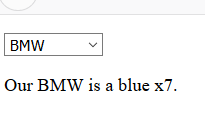
When a selection is made, a text is printed:
P.S. In this example the first option is Select Car. It is not from the array, and not meant to be selected. It is assigned value -1.
Categories: Uncategorized
Tags: array, drop-down, html, html5, javascript, js, object, select